Unsloth is the fastest way most people get a LoRA trained on a single GPU. The speed is real; the part that decides whether the result is any good is the dataset you hand it. Here is the format contract, the failure modes, and where the data comes from.
What Unsloth actually is
Unsloth is a patching layer over the Hugging Face stack rather than a replacement for it. It hard-depends on transformers, trl, peft, accelerate and bitsandbytes, and replaces the hot paths — attention, the LoRA matmuls, cross-entropy, RMS norm, RoPE, SwiGLU — with hand-written Triton kernels and manually derived backward passes.
That matters for your data for one reason: the trainer is TRL's. Unsloth's examples import SFTTrainer and DPOTrainer straight from TRL, so the dataset contract you are writing against is TRL's contract. Data prepared for Unsloth is portable to Axolotl, LLaMA-Factory or plain TRL with little or no change.
It now also ships as Unsloth Studio, a no-code web UI that also installs as a desktop app, alongside the Python package that engineers mean when they say Unsloth. Everything below concerns the package.
The four dataset shapes it accepts
Unsloth's documentation describes four data shapes, and also covers loading from the Hub, which is a loader rather than a shape.
Raw text — a single text field per row, for continued pretraining where you want the model to absorb a domain rather than learn a behaviour.
Alpaca — instruction, optional input, output. One turn in, one turn out. Note that the docs render these field names capitalised while the working notebooks use lowercase keys; use lowercase.
ShareGPT — a conversations list of {from, value} objects alternating between human and gpt, for anything multi-turn.
ChatML — a messages list of {role, content} alternating user and assistant. This is the shape TRL treats as canonical.
Loading from the Hub is not a fifth format — load_dataset(...) returns data in one of the above, and you still have to know which.
The EOS token, and why models generate forever
This is the single most common data-preparation bug in the whole ecosystem, and Unsloth's own canonical notebook flags it in a code comment: the formatting function must append the tokenizer's EOS token to every example, "otherwise your generation will go on forever!"
The mechanism is simple. The model learns to stop by seeing a stop token at the end of training examples. Omit it and the model has never been shown where an answer ends, so at inference it keeps producing text until it hits your length limit. Nothing errors during training and the loss curve looks perfectly healthy.
EOS_TOKEN = tokenizer.eos_token          # must not be omitted

alpaca_prompt = """Below is an instruction describing a task, paired with an input.
Write a response that appropriately completes the request.

### Instruction:
{}

### Input:
{}

### Response:
{}"""

def formatting_prompts_func(examples):
    texts = []
    for ins, inp, out in zip(examples["instruction"],
                             examples["input"],
                             examples["output"]):
        texts.append(alpaca_prompt.format(ins, inp, out) + EOS_TOKEN)
    return {"text": texts}

dataset = dataset.map(formatting_prompts_func, batched=True)

print(repr(dataset[0]["text"][-80:]))    # look at it once - is the EOS there?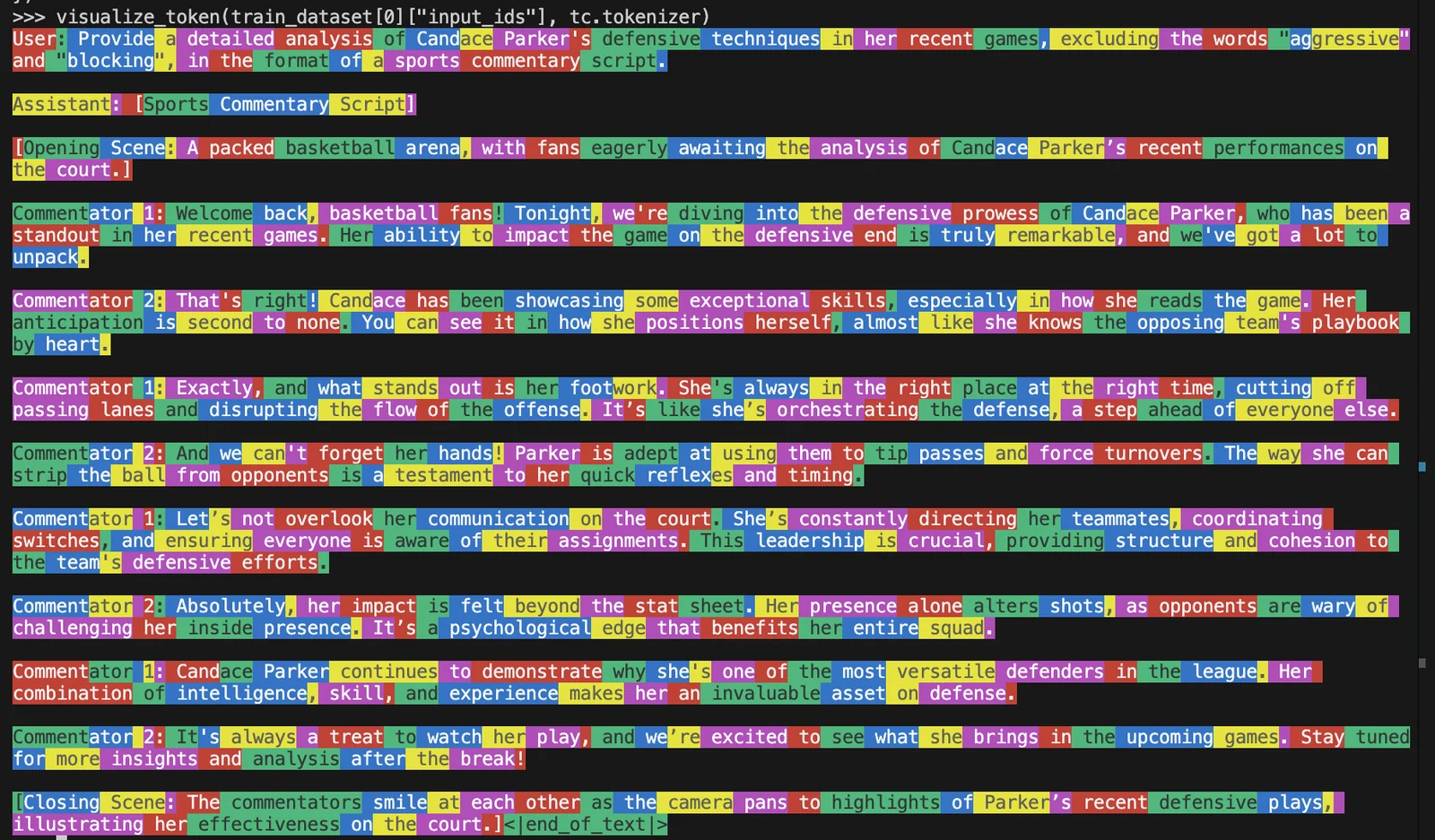
Multi-turn data, and training only on the answers
For conversational data the path is: normalise the field names, apply the model's own chat template, then mask the loss so only assistant turns contribute. Unsloth ships helpers for all three steps.
standardize_sharegpt converts {from, value} into {role, content}. get_chat_template applies one of dozens of named templates — including per-family ones for Llama, Mistral, Qwen, Gemma and Phi — and can remap keys on the fly without rewriting your files. train_on_responses_only then masks the prompt tokens.
Get that last call wrong and you hit a distinctive failure: every label becomes -100 and your training loss is identically zero. Unsloth's troubleshooting notes name this explicitly — it means the response markers it was given do not match the template that model actually uses. A loss of exactly 0.0 is never a good sign.
from unsloth.chat_templates import (
    get_chat_template, standardize_sharegpt, train_on_responses_only)
from datasets import load_dataset

tokenizer = get_chat_template(tokenizer, chat_template="llama-3.1")

dataset = load_dataset("<org>/<dataset>", split="train")
dataset = standardize_sharegpt(dataset)      # {from,value} -> {role,content}

def fmt(examples):
    return {"text": [tokenizer.apply_chat_template(c, tokenize=False,
                                                   add_generation_prompt=False)
                     for c in examples["conversations"]]}

dataset = dataset.map(fmt, batched=True)

trainer = SFTTrainer(model=model, tokenizer=tokenizer, train_dataset=dataset, ...)

# mask the user turns - both markers must match the llama-3.1 template exactly
trainer = train_on_responses_only(
    trainer,
    instruction_part = "<|start_header_id|>user<|end_header_id|>\n\n",
    response_part    = "<|start_header_id|>assistant<|end_header_id|>\n\n",
)

# after one step, assert the loss is not exactly zeroHow much data, honestly
Unsloth publishes row-count guidance for supervised fine-tuning and for GRPO but none for preference tuning, and it is worth being precise about which is which.
For SFT the documentation recommends "a bare minimum of at least 100 rows" with "over 1,000 rows" preferable, and 1–3 epochs. It also notes that a training loss below 0.2 suggests overfitting. As a rough rule of thumb, a loss that settles somewhere around 0.5 to 1.0 is usually healthy, depending on the task.
For GRPO, Unsloth's reinforcement-learning guide suggests at least 500 rows. For DPO, ORPO and KTO, neither Unsloth nor TRL publishes a row count. Anyone quoting you a specific number for preference tuning is giving you a rule of thumb, not a documented figure. The honest answer is that it depends on how much the behaviour you are correcting differs from the base model's, and that you should look at the reference datasets in the field for scale. The table gives Unsloth's published minimum VRAM for fine-tuning at each model size.
| Model size | QLoRA (4-bit) | LoRA (16-bit) |
|---|---|---|
| 3B | 3.5 GB | 8 GB |
| 7B | 5 GB | 19 GB |
| 8B | 6 GB | 22 GB |
| 14B | 8.5 GB | 33 GB |
| 27B | 22 GB | 64 GB |
| 32B | 26 GB | 76 GB |
| 70B | 41 GB | 164 GB |
| 405B | 237 GB | 950 GB |
Finding the dataset before you format it
All of the above assumes you have data. In practice the slow part of a fine-tune is not the training — on a single GPU with Unsloth that may be twenty minutes — it is deciding what to train on, and discovering three days in that the promising dataset is research-only, or is 90% duplicates, or does not actually contain the field you need.
That is the problem Dataset Finder exists for: describe the model you are training and the behaviour you want, and get back datasets ranked by fit, with the licence, size and structure visible before you download anything. Instruction-tuning sets, preference pairs, domain corpora for continued pretraining — filtered by what you are actually allowed to ship.
Questions people ask
Can Unsloth train on my own files rather than a Hub dataset?
Yes. Anything the datasets library can load works — point load_dataset at local JSON, JSONL, CSV or Parquet. The format contract is unchanged: you still need to end up with either a text field or a messages list, and you still need the EOS token.
Which learning rate should I use?
Unsloth's own examples use 2e-4 for LoRA SFT and 5e-6 for DPO — a fortyfold difference, which surprises people. Preference tuning makes small corrections to an already-aligned model, so it needs a much gentler rate. For continued pretraining the docs use 5e-5 with a separate, smaller embedding learning rate.
Do I need to include a system prompt in training data?
Only if you want the model to respond to one at inference. If every example carries an identical system prompt the model partly absorbs it into the weights. If you want it to generalise across different system prompts, vary them during training, including omitting them sometimes.
Is data prepared for Unsloth portable to other trainers?
Largely yes, because Unsloth's trainers are TRL's. A messages list with role/content is accepted by TRL directly, by Axolotl as its default, and by LLaMA-Factory through a column mapping. Store conversations in that shape and you keep your options open.
What about fine-tuning a model that is already fine-tuned?
Possible, but a second round of fine-tuning can erode what the first one taught: the earlier behaviour and some general knowledge can degrade. If you are stacking a second behaviour on an instruct model, keep the learning rate low, keep the dataset tight, and evaluate the original capabilities as well as the new one — regressions here are easy to miss.