Video annotation costs less per frame than image annotation because most frames are never drawn by hand: annotators place keyframes and software fills the gaps. The cost moves to two decisions, how often to place keyframes and how to keep each object’s identity consistent, and both have been measured.
Frames are not independent images
Labelling every frame of a 30 fps clip as a separate image wastes most of the effort, because adjacent frames are nearly identical. The YouTube-VOS authors made this explicit when they annotated every fifth frame only: intermediate frames can be omitted because neighbouring frames are highly correlated, which let the same budget cover more videos and objects.
What video adds is the track, the same object under the same ID across time. A video label set is a set of tracks plus per-frame geometry, and its errors come in two kinds. Geometry errors are the familiar image kind: a loose box, a missed object. Identity errors are new: two objects swapping IDs, one object split into two tracks, a track that continues onto the wrong object after an occlusion. Tracking metrics score the second kind separately, so the annotation process has to control it separately.
The per-frame shapes are the same as for still images, and our comparison of image annotation types covers their cost. This article covers what changes when they are strung together.
Keyframes and interpolation: the measured trade-off
The most thorough measurement is still VATIC (Vondrick, Patterson and Ramanan, IJCV 2013), which ran crowdsourced video annotation on Mechanical Turk and quantified the trade-off between human clicks, computer tracking, cost and accuracy. Its findings, in its own numbers:
- Fixed-rate keyframes beat letting annotators choose: on VIRAT, users were 17% faster with fixed-rate keyframes.
- On their two-hour basketball game, a worker annotated every 12 frames on average.
- On a medium-difficulty video, 10% error was reachable at 0.001 user clicks per frame. Difficult videos needed 0.2 clicks per frame for the best accuracy.
- Fast, non-linear motion, such as basketball players, forced frequent keyframes; a frame-by-frame labelling of their basketball game would have cost US$5,947.
- Tracking-based interpolation beat linear interpolation where image features were easy to extract, and did no better than linear interpolation on heavily occluded objects.
- Total effort for VIRAT was 8 person-months for 27 hours of video, and interpolation cut annotation effort by an order of magnitude against a naive approach.
Track IDs, occlusion and re-entry
Identity rules must be written down, because two careful annotators will otherwise resolve the same occlusion differently. The MOT16 protocol for pedestrian tracking is a good model to copy, because it states each rule rather than leaving it to judgement:
- Box the full extent of the person, including occluded parts, as tightly as possible; estimate hidden parts from size, shadows and neighbouring frames.
- Keep annotating through an occlusion if the position can be determined unambiguously.
- A person who leaves the field of view and returns later gets a new ID. So does a target whose position was ambiguous through a long occlusion.
- Record a visibility ratio between 0 and 1, computed from the annotations, rather than asking annotators to grade occlusion by eye.
- Give look-alikes their own classes (static people, reflections, people on vehicles, distractors), so a tracker is neither rewarded nor penalised for following them.
- Put the rules, with two or three worked examples from your own footage, into the guidelines; our annotation guidelines template has a section for edge cases decided in advance.
Temporal labels: actions, events and boundaries
Actions and events are labelled in time rather than space, and their boundaries are softer than any object edge. When Sigurdsson et al. had crowd workers re-annotate the extents of actions, average agreement with the original ground truth was 72.5% IoU on Charades and 58.7% on MultiTHUMOS. Ignoring the ambiguous regions at each boundary raised the Charades figure to 79.8%. The authors’ conclusion was that the temporal extent of an activity is ambiguous even for humans.
The AVA designers sidestepped the problem. They labelled atomic actions on keyframes sampled at 1 Hz, gave annotators 1.5 seconds of context either side of each keyframe, and said they did so to avoid “unrealistically precise temporal annotation of action boundaries”. Each clip had three annotators, and a label counted only if at least two verified it.
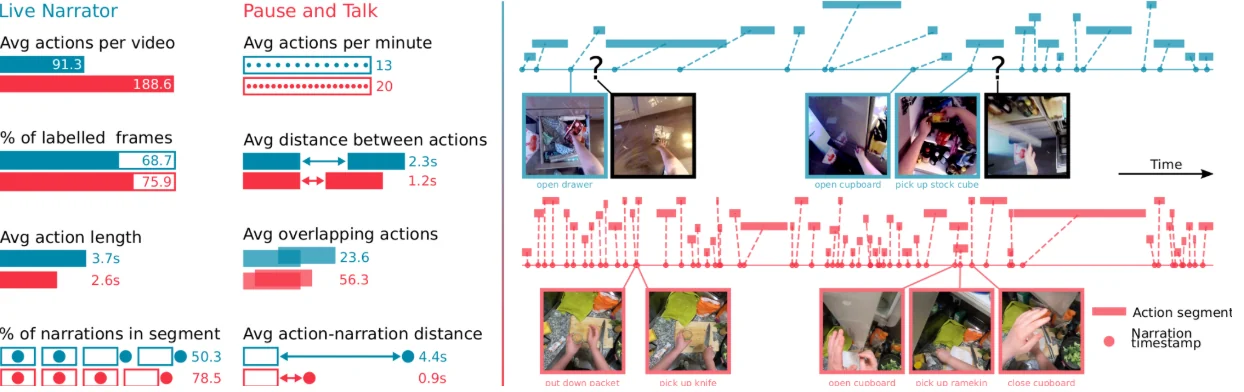
The interface changes what gets labelled at all. EPIC-KITCHENS-100 replaced non-stop narration, which its authors found raised mental load and led to missed or misspoken actions, with “pause-and-talk” narration, then had crowd workers set temporal bounds, raising the workers on that step from four to five to improve quality. The new pipeline produced 54% more actions per minute and 128% more action segments. The same paper measured the cheaper alternative: training on single timestamps instead of full segments was 11% worse in top-1 action accuracy.
For an order, define starts and ends by an observable event (the hand touches the handle) rather than an intention (begins to open the door), give a tolerance in frames or seconds, and score agreement with temporal IoU rather than exact frame matches. For segment-level class labels, a chance-corrected agreement measure is more honest than raw agreement; our Cohen’s kappa calculator computes one. A disagreement of a few frames at a boundary is often the task’s natural noise, not an error.
Choosing a frame rate for annotation
Published datasets span a wide range of annotated frame rates, and most chose deliberately. TAO, which labels tracks with boxes over a long-tailed vocabulary, annotated at 1 frame per second, trading granularity for scale and diversity, and cited prior work finding that dense labelling does not change the relative ranking of methods. That is the useful test: annotate densely only where training or evaluation needs per-frame accuracy, such as fast motion, short events or contact timing.
A practical procedure is to label a pilot clip densely, subsample it to 1, 2 and 6 fps, interpolate back, and measure how far the interpolated labels drift from the dense ones. Choose the lowest rate whose drift is inside your tolerance. This is VATIC’s trade-off computed on your own footage. Many public video datasets ship labels at sparse rates, so check the rate before treating them as per-frame ground truth.
| Dataset | Annotated rate | Labels | Rationale or note |
|---|---|---|---|
| YouTube-VOS | every 5th frame of 30 fps | masks | adjacent frames correlated |
| SA-V (val and test) | 6 fps | masks | hard targets, manual set-up |
| TAO | 1 fps | boxes and tracks | scale over granularity |
| AVA | 1 Hz keyframes | person boxes, actions | avoid false boundary precision |
| nuScenes | 2 Hz keyframes | 3D cuboids | keyframes span all sensors |
Checking video labels: the metrics that catch ID switches
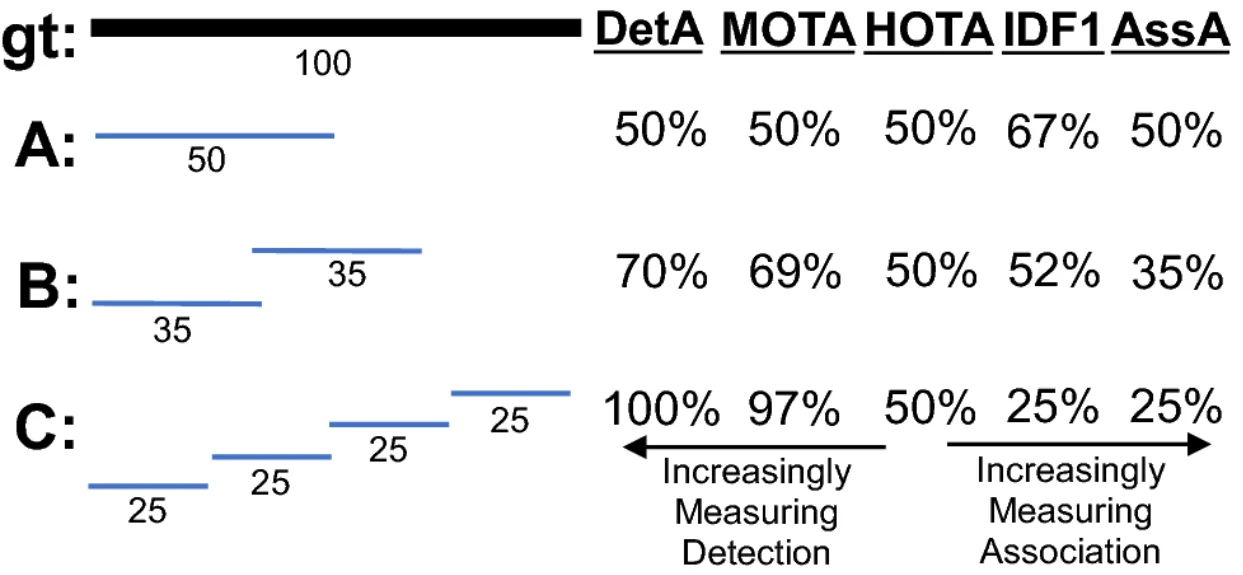
Video labels can be checked with the metrics used to score trackers, by treating a reviewer’s tracks as ground truth and the delivered tracks as predictions, or by comparing two annotators on the same clip. The three common metrics weigh errors differently:
- MOTA = 1 − Σ(FN + FP + IDSW) / Σ GT over all frames, as defined in the MOT16 paper. It counts identity switches, but in the analysis behind the HOTA metric it over-emphasises detection, so a label set with many swaps can still score well.
- IDF1 rewards each true object keeping one ID for as long as possible. The same analysis finds it over-emphasises association.
- HOTA combines a detection score (DetA) and an association score (AssA) explicitly, so you can see which kind of error dominates a batch.
Questions people ask
How does video annotation interpolation work?
An annotator draws the object on keyframes and software computes the frames in between, either linearly or by following image features with a tracker. The annotator then scrubs through and adds a keyframe wherever the interpolated box drifts. VATIC found tracking-based interpolation better when features are easy to extract, and no better than linear interpolation through heavy occlusion.
How many frames should you annotate in a video?
It depends on motion, not on the project. Published datasets annotate at 1 fps (TAO), 2 Hz (nuScenes keyframes) or 6 fps (YouTube-VOS, SA-V evaluation). VATIC measured 0.001 clicks per frame as enough for 10% error on a medium-difficulty video and 0.2 on difficult ones. Label a pilot densely, subsample it and pick the lowest rate whose interpolation error you can accept.
What is the difference between image and video annotation?
The per-frame shapes are the same, but video adds identity and time. Each object becomes a track with one ID, so occlusion, exit and re-entry need written rules, and events need start and end times whose boundaries humans themselves disagree on. Most frames are interpolated rather than drawn, which makes video cheaper per frame and adds interpolation drift as a new error source.
How do you annotate object tracking data?
Draw each object on keyframes, interpolate, correct drift, and keep one ID per object under written rules for occlusion and re-entry. MOT16’s protocol is a good template: full-extent boxes, annotation through occlusion when the position is unambiguous, new IDs for objects that leave and return, a visibility ratio, and separate classes for look-alikes such as reflections.
How long does video annotation take?
Published figures vary with the task. VATIC reports 8 person-months for 27 hours of VIRAT video with boxes. For masks, SAM 2’s data engine measured 37.8 seconds per frame without video propagation and 4.5 seconds with it. Kuznetsova et al. cut box annotation time by about half against linear interpolation. Dense, fast motion and frequent occlusion all push the figure up.