For images, video and 3D, CVAT is the default self-hosted choice; for projects that mix text, audio and images, Label Studio; for one person on a laptop, labelme, X-AnyLabeling or VIA. The catch is that the free editions leave out much of the multi-annotator QA tooling, which the vendors sell in paid tiers. Licences also differ more than people assume.
The short list
Nine tools cover almost every self-hosted use case. The table gives each one’s licence as stated in its repository’s LICENSE file and its latest release on PyPI (for VIA, its changelog; for Xtreme1, its README), all checked on 31 October 2026. Release dates matter: a tool that has not shipped in two years is unlikely to have integrations for this year’s models.
Is CVAT better than Label Studio? For computer vision, usually: it handles video tracks, 3D cuboids and the vision export formats natively. Label Studio is the better generalist, with configurable interfaces for text, audio, time series and images. Both are actively released, both run in Docker, and both keep their most advanced QA features for paid editions.
If you are choosing for a team, three tests on a real batch settle most of it. Can two annotators and a reviewer work the same task without overwriting each other? Does an export, re-imported, reproduce every box, class and attribute? And does model assistance work with the model you actually intend to use, not the one in the demo? An afternoon with fifty of your own images tells you more than any feature table, this one included.
| Tool | Licence | Data types | Runs as | Latest release |
|---|---|---|---|---|
| CVAT | MIT | image, video, audio, 3D point clouds | web app (Docker Compose) | 2.81.0 (SDK), 29 Oct 2026 |
| Label Studio | Apache-2.0 | image, audio, text, HTML, time series, video | web app (pip, Docker) | 1.23.2, 29 Sep 2026 |
| labelme | GPL-3.0 | image, video | desktop | 7.9.1, 25 Oct 2026 |
| X-AnyLabeling | GPL-3.0 | image, video, text, point clouds | desktop, optional server | 4.3.0, 31 Oct 2026 |
| VIA | BSD-2-Clause | image, audio, video | one HTML file, offline | 3.0.13, 2 Jul 2024 |
| doccano | MIT | text | web app (Docker) | 1.8.4, 20 Jul 2023 |
| Argilla | Apache-2.0 | text, LLM feedback, some multimodal | server (Docker, HF Spaces) | 2.8.0, 10 Mar 2025 |
| MONAI Label | Apache-2.0 | 3D medical, pathology, endoscopy | server plus viewer plugins | 0.8.5, 25 Nov 2024 |
| Xtreme1 | Apache-2.0 | image, LiDAR, camera-LiDAR fusion | web app (Docker) | v0.9.3 (README) |
Licences, and what they mean commercially
Can open-source annotation tools be used commercially? All nine can. MIT, Apache-2.0 and BSD-2-Clause are permissive: you may run, modify and host the software for paying work, provided you keep the copyright notices, and Apache-2.0 adds an explicit patent grant.
labelme and X-AnyLabeling are GPL-3.0. Using them internally, including to label data you sell, carries no special obligation; the licence governs the software, not the annotation files you make with it. The obligations arrive when you distribute the program or a modified version, for example by bundling it into a product you ship to customers, in which case the source must go with it. If that is your plan, ask counsel before you build on it.
Two further caveats. Models you plug in carry their own licences: CVAT’s README notes that some of its serverless assets and dependencies are licensed separately, and the same applies to any detector or segmenter you connect to Label Studio or X-AnyLabeling. And “open source” describes the core, not every feature. CVAT’s README lists the quality-control interface, built-in SAM 2 and SAM 3 auto-labelling and SSO among capabilities of its paid plans. Label Studio’s edition comparison marks reviewer assignment, overlap settings, agreement metrics and SSO as absent from the Community edition.
So the free editions give you a good labelling interface. Much of the multi-annotator QA, the part that turns labels into a dataset you can defend, is what you pay for or build yourself. labelme is a smaller case of the same pattern: installing from pip is free, while the standalone app is a one-off paid download.
Image and video: CVAT, Label Studio and desktop tools
CVAT covers boxes, polygons, masks, keypoints, cuboids and tags on images, video and point clouds, exports more than 20 formats, and has a Python SDK for automating tasks. Its Community edition runs automatic annotation through serverless functions on Nuclio, with ready-made ones for Segment Anything, RetinaNet, an HRNet pose model, the TransT tracker and YOLOv7. Label Studio takes a different approach: each project’s interface is defined in a template, and an ML backend lets you pre-label tasks with your own model and retrain it as annotations arrive.
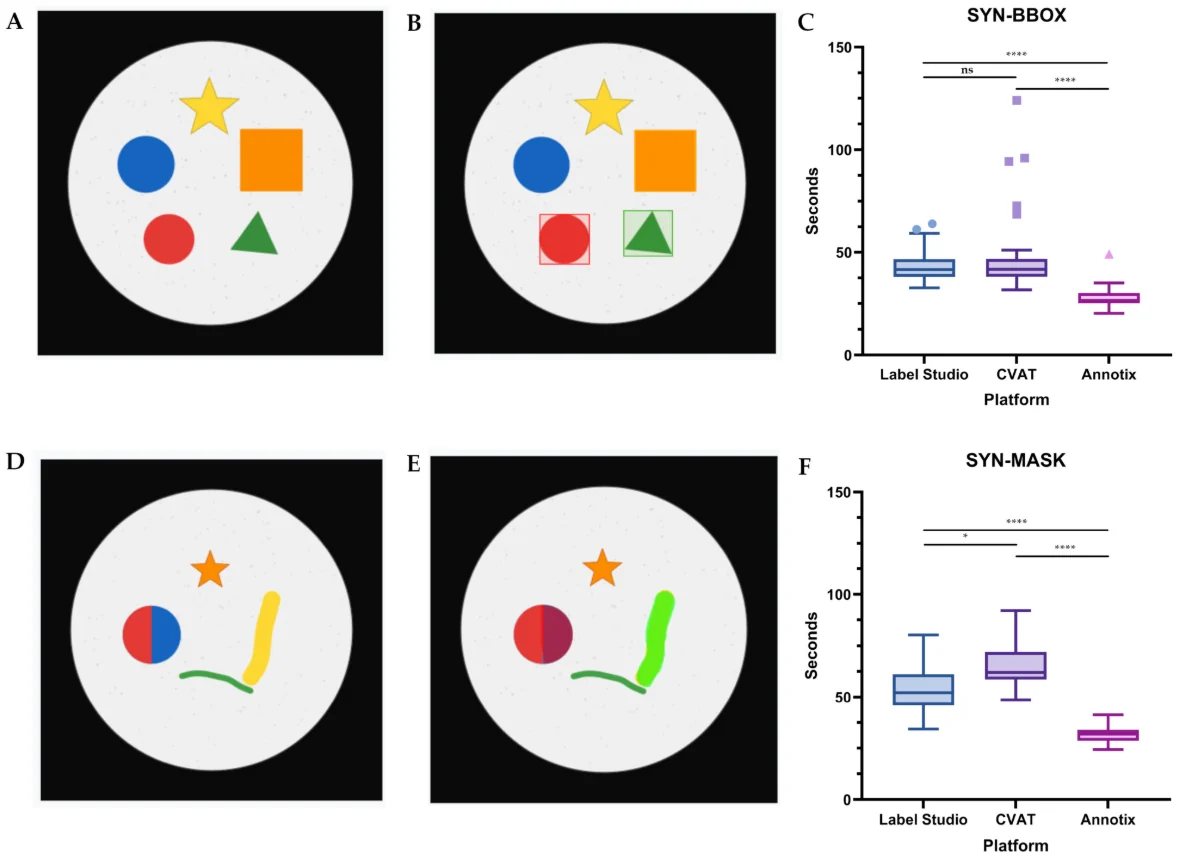
Measured head to head, the two are close. In a 2026 study in Computers, three evaluators annotated the same synthetic images in each tool. For bounding boxes the median time per image was 41.67 seconds in CVAT and 41.50 in Label Studio, with no significant difference; for masks, Label Studio was faster, at 52.17 seconds against 62.00. The sample was small and the authors were presenting a tool of their own, which was faster than both, so read it as evidence that interface choice moves seconds, not multiples.
For a single annotator, desktop tools avoid running a server. labelme offers point-to-polygon and point-to-mask annotation with SAM and EfficientSAM, text-to-annotation with YOLO-World and SAM 3, and exports VOC and COCO for segmentation. Since version 7 its internal Python modules are private, so read its JSON files directly rather than importing the package. X-AnyLabeling has the largest model library of the group: SAM 1, 2 and 3, Grounding DINO, the YOLO families and several vision-language models, with export to COCO, VOC, YOLO, DOTA and MOT, and an optional server for remote inference.
VIA, the VGG Image Annotator from Oxford’s Visual Geometry Group, is the minimalist: a self-contained HTML page under 400 KB that runs offline in a browser, with no installation and no model assistance. It suits small manual jobs on locked-down machines where nothing can be installed.
Text and LLM data: Label Studio, Argilla, doccano
For text, Label Studio is the actively released option, covering classification and span labelling alongside its other data types. Argilla, Apache-2.0 and closely tied to the Hugging Face ecosystem, was built for human feedback on NLP and LLM work such as RAG and preference tuning, and deploys in one click on Hugging Face Spaces.
Argilla’s README now carries a notice that its original authors have moved on: no new features are planned, bug fixes will continue, and the project is looking for maintainers. Its last release on PyPI, 2.8.0, dates from March 2025. That is workable for an existing pipeline. It is a risk for a new one that will need integrations for models that do not exist yet.
doccano, MIT-licensed, handles text classification, sequence labelling and sequence-to-sequence tasks in a collaborative, multi-user interface. Its last current release is 1.8.4 from July 2023; a 1.8.5 upload in January 2026 was yanked from PyPI. It remains fine for a small named-entity project, on the understanding that nothing new is coming.
If your text work is preference pairs or model evaluation, the interface matters less than the protocol: blind ordering of the two responses, a tie option, and a written rubric. Label Studio also exports text annotations as CoNLL 2003 and spaCy files, which saves a conversion step for NER.
3D and medical: dedicated tools
For point clouds, CVAT supports cuboid annotation in 3D, and X-AnyLabeling added point-cloud detection and segmentation on 1 October 2026. Xtreme1, Apache-2.0, is built around LiDAR and camera-LiDAR fusion, with built-in pre-labelling models for 2D and 3D detection. All three handle the drawing; for multi-sensor programmes, check calibration import and track-ID export on a real sequence before choosing.
Medical imaging has its own tool. MONAI Label, Apache-2.0 and described by Diaz-Pinto et al., is a server that exposes labelling apps to existing viewers: 3D Slicer and OHIF for radiology, QuPath, the Digital Slide Archive and CVAT for pathology, and CVAT for endoscopy. SAM 2 is included by default for 2D slices and for propagating a mask across 3D volumes. Its last release, 0.8.5, dates from November 2024.
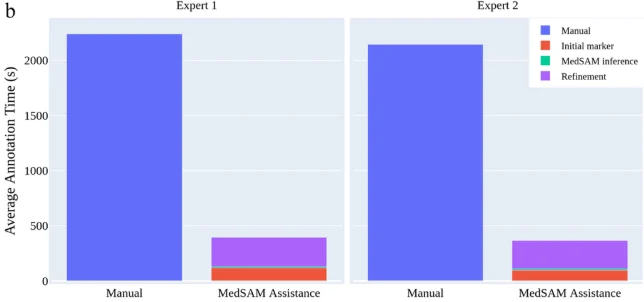
The case for model assistance is strongest here, because expert time is the cost. In the Ma et al. (MedSAM) user study, two radiologists segmented adrenal tumours in 10 CT cases, 733 slices, by hand and then with the model proposing masks from sparse markers; annotation time fell by 82.37% and 82.95%. Before any of this, check that the data may leave its source system: our medical data compliance piece covers de-identification and its limits.
Export formats and the self-hosting bill
Every tool here exports more than one format, and every conversion is a chance to corrupt a dataset. Most problems come from coordinate conventions and class indexing: COCO JSON boxes start at the top left in absolute pixels, the YOLO format uses normalised centres, Pascal VOC stores corners, and category IDs can be renumbered silently between them. Export to the format your training code reads, keep the tool’s native export as the master copy, and see our guide to converting between formats before you round-trip anything.
The software is free; running it is not. Self-hosting means a server, storage for the media, backups, upgrades (CVAT ships a release every week or two), single sign-on if your security team requires it, and a person who owns all of that. Hosted editions of the same tools start at $23 per user a month for CVAT Online billed yearly and $99 a month for up to 12 users on Label Studio Starter Cloud.
A managed service is cheaper when the scarce thing is labelling hours rather than software. Vendors bring the tool, the people and the QA together; CVAT.ai and HumanSignal, the companies behind the two main tools, both sell labelling services, and our guide to labelling companies covers the rest. The rate mechanics are in our data labelling pricing guide.
Questions people ask
Is CVAT better than Label Studio?
For computer vision, usually yes: CVAT handles video tracking, 3D cuboids and vision export formats natively and ships releases every week or two. Label Studio is better for mixed projects with text, audio and time series. In one small timing study the two were equally fast for boxes, and Label Studio was faster for masks. Both keep their most advanced QA tooling for paid editions.
What is the best free annotation tool?
It depends on the job. CVAT for team computer-vision work on a server; Label Studio for mixed data types; labelme or X-AnyLabeling for one person labelling images with SAM assistance on a desktop; VIA for quick manual work in a browser with nothing installed; MONAI Label for 3D medical imaging. Check the latest release date before committing, since some tools are no longer adding features.
Which annotation tools support COCO and YOLO export?
CVAT exports more than 20 formats, including COCO, YOLO, Ultralytics YOLO, Pascal VOC, KITTI and MOT. X-AnyLabeling exports COCO, VOC, YOLO, DOTA and MOT among others. labelme exports VOC and COCO for segmentation through its example scripts, and Label Studio offers COCO, YOLO and Pascal VOC for vision tasks. Always round-trip a sample and check that boxes and class IDs survive.
Can open-source annotation tools be used commercially?
Yes. CVAT and doccano are MIT, Label Studio, Argilla, MONAI Label and Xtreme1 are Apache-2.0, and VIA is BSD-2-Clause, all permissive. labelme and X-AnyLabeling are GPL-3.0: free to use internally, with obligations if you distribute the software or a modified version. The labels you produce are your data, but plug-in model weights carry their own licences.
Which annotation tools support video and 3D point clouds?
CVAT supports both, with video tracks and 3D cuboids. Label Studio and VIA handle video; labelme has video examples. X-AnyLabeling added point-cloud detection and segmentation in October 2026, and Xtreme1 is built for LiDAR and camera-LiDAR fusion. For 3D medical volumes, MONAI Label connects to 3D Slicer, with SAM 2 to propagate masks across slices.