YOLO's format is the minimal one: a plain text file beside each image, one line per object, five numbers per line. That simplicity is why it is everywhere, and why so many conversions to it are subtly broken.
The line format
Each image gets a .txt file with the same stem. Each line describes one object as class_index x_centre y_centre width height, space separated.
Every geometric value is normalised to the range 0–1 by dividing x values by the image width and y values by the image height. The class index is a zero-based integer into your class list. An image with no objects gets an empty file, or no file at all — both are read as a negative example.
0 0.481250 0.573958 0.112500 0.187500
0 0.734375 0.561458 0.096875 0.164583
2 0.195312 0.621875 0.278125 0.316667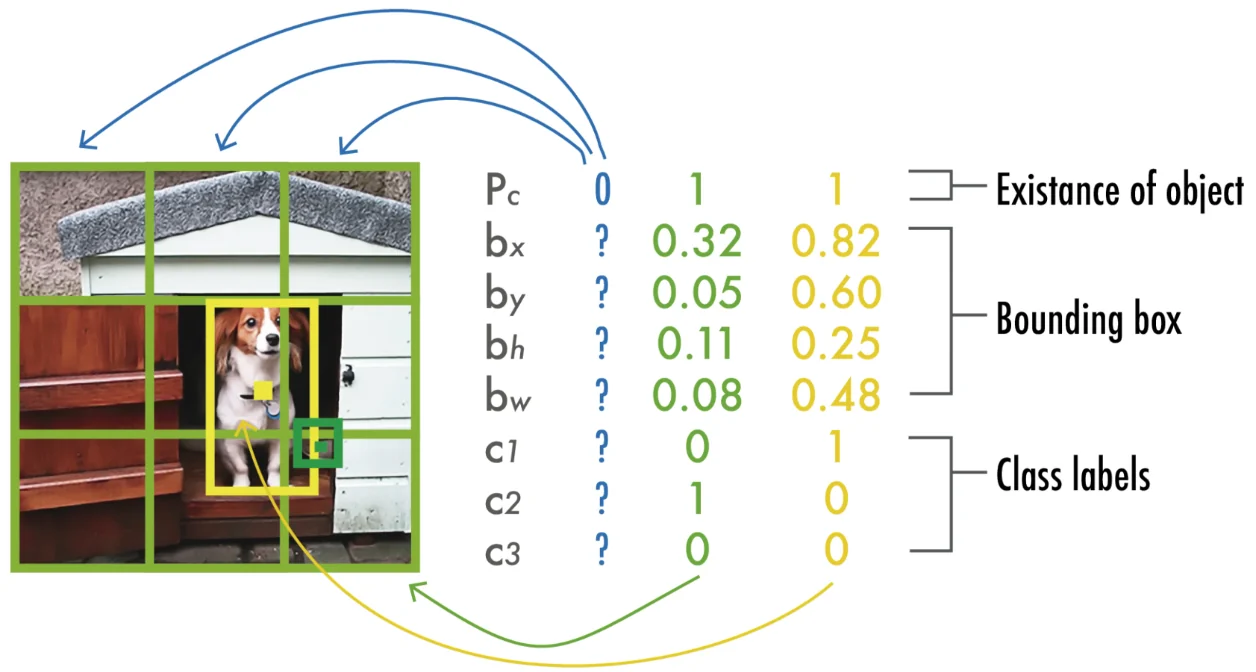
The directory layout and the data YAML
Modern YOLO training expects images and labels in sibling directories whose paths differ only by the images / labels segment. The loader derives each label path from its image path by that substitution, which is why renaming one directory breaks training with an unhelpful error.
A small YAML file then declares the splits and the class names. The order of names is the contract: index 0 in your label files means the first entry here, and nothing validates that you got it right.
dataset/
  images/train/000001.jpg
  images/val/000042.jpg
  labels/train/000001.txt
  labels/val/000042.txt

# data.yaml
path: /abs/path/to/dataset
train: images/train
val: images/val
names:
  0: person
  1: bicycle
2: carConverting from COCO without breaking the boxes
Two things change in the conversion: the box goes from corner-and-size to centre-and-size, and everything gets divided by that image's own dimensions. A third thing changes quietly — COCO category ids are not contiguous, so you must build an explicit dense remapping and save it.
The script below does all three and refuses to write a file it could not validate. Run it on a copy of your annotations, then spot-check a handful of images by drawing the converted boxes back on — a conversion that is right on five random images is almost always right.
import json, os, sys
from collections import defaultdict

ann_file, img_root, out_root = sys.argv[1], sys.argv[2], sys.argv[3]
d = json.load(open(ann_file))

# dense, stable class remapping - save it, you will need it later
cats = sorted(d["categories"], key=lambda c: c["id"])
remap = {c["id"]: i for i, c in enumerate(cats)}
names = {i: c["name"] for i, c in enumerate(cats)}

imgs = {i["id"]: i for i in d["images"]}
# crowd regions have no single box; images containing them are skipped whole,
# but also remove them from images/: a missing label file is read as background
crowd = {a["image_id"] for a in d["annotations"] if a.get("iscrowd")}
per_image = defaultdict(list)
skipped = 0

for a in d["annotations"]:
    if a["image_id"] in crowd:
        skipped += 1; continue
    im = imgs[a["image_id"]]
    W, H = im["width"], im["height"]
    x, y, w, h = a["bbox"]
    # clip to the image, then convert corner->centre and normalise by THIS image
    x0, y0 = max(0.0, x), max(0.0, y)
    x1, y1 = min(float(W), x + w), min(float(H), y + h)
    if x1 - x0 <= 1 or y1 - y0 <= 1:
        skipped += 1; continue
    cx, cy = (x0 + x1) / 2 / W, (y0 + y1) / 2 / H
    bw, bh = (x1 - x0) / W, (y1 - y0) / H
    assert 0 <= cx <= 1 and 0 <= cy <= 1 and 0 < bw <= 1 and 0 < bh <= 1
    per_image[im["file_name"]].append(
        f"{remap[a['category_id']]} {cx:.6f} {cy:.6f} {bw:.6f} {bh:.6f}")

os.makedirs(out_root, exist_ok=True)
for fn, lines in per_image.items():
    stem = os.path.splitext(os.path.basename(fn))[0]
    open(os.path.join(out_root, stem + ".txt"), "w").write("\n".join(lines) + "\n")

# negatives: images with no annotations still need an empty file
negatives = 0
for im in d["images"]:
    if im["id"] in crowd:           # skipped above, not a negative
        continue
    stem = os.path.splitext(os.path.basename(im["file_name"]))[0]
    p = os.path.join(out_root, stem + ".txt")
    if not os.path.exists(p):
        open(p, "w").close(); negatives += 1

json.dump(names, open(os.path.join(out_root, "_classes.json"), "w"), indent=1)
print(f"{len(per_image)} labelled, {negatives} negative, {len(crowd)} crowd images skipped, "
      f"{skipped} annotations skipped")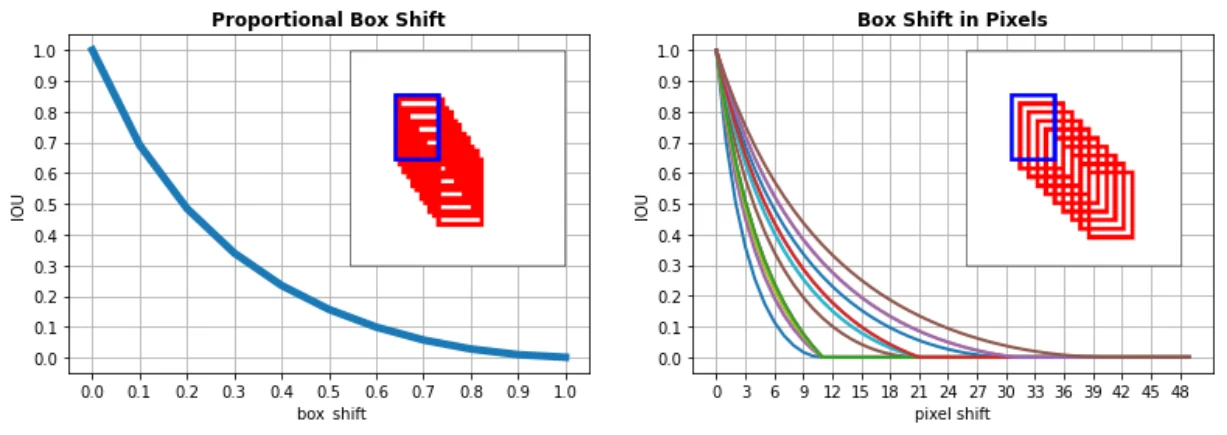
Segmentation and pose use the same file, more numbers
YOLO's segmentation variant keeps one line per object but replaces the four box numbers with a flat list of normalised polygon points: class x1 y1 x2 y2 .... There is no run-length option, so COCO crowd regions have to be decoded to polygons or dropped.
The pose variant appends keypoint triplets after the box: class cx cy w h px1 py1 v1 px2 py2 v2 ..., where visibility is 0 for absent, 1 for occluded and 2 for visible. The number of keypoints is fixed per dataset and declared in the YAML, so every line must carry the same count — pad absent points rather than omitting them.
Questions people ask
Why are my boxes shifted after converting?
Almost always because the conversion normalised against a single resolution instead of each image's own. Check whether your dataset mixes image sizes, and whether any images have EXIF orientation that your reader applies but the annotation tool did not — a rotated image with unrotated labels produces exactly this symptom.
Do I need an empty file for images with no objects?
Either an empty file or no file works with current loaders, and both are treated as a negative example. Writing the empty file is better practice: it is the difference between 'this image genuinely has nothing' and 'this label file went missing', which matters when you are auditing a set you did not build.
Can I keep the original class ids instead of remapping?
Only if they already form a contiguous zero-based range. YOLO uses the index as a position into the names list, so a gap means an unused output neuron and an off-by-n in everything downstream. Remap, and store the mapping next to the weights.
Is the YOLO format tied to a specific YOLO version?
The detection line format has been stable across versions and is read by the wider tooling ecosystem. The YAML keys and the segmentation and pose variants have changed between releases, so check the documentation for the exact version you are training with.